Non-training grade (NTG) junior doctors/other healthcare professionals
Browse and Search Collapse all
NTG basics
What is an "NTG"?
In the context of the Horus ePortfolio, an "NTG" is a non-training grade junior doctor/other healthcare professional working in a foundation-level (or similar) post but not a member of the UK Foundation Programme.
NTGs:
- do not have a connection to NHS England (NHSE) and their responsible officer is not the local NHSE postgraduate dean (instead, their responsible officer is usually the Medical Director of the employing organisation or their representative)
- do not belong to a Foundation School
- are not on a training programme
Examples include:
- LAS: locum appointment for service (LAS) doctors covering F1 or F2 posts that have not been allocated to a foundation doctor
- Trust grade: trust grade doctors working in posts that are at a similar level to F1 or F2 posts (eg "trust SHO")
-
Pre-specialty:
- junior doctors who have completed the Foundation Programme but have not yet commenced a specialty training programme, working in posts at a similar level to F2 posts (sometimes known as "pre-specialty" or "F3" junior doctors)
- Other: other types of NTGs may also be possible which includes those not currently working in an organisation (within England) who employs foundation doctors and already have access to Horus ePortfolio.
Learn more about:
- what NTGs can use Horus for
- what NTGs can't use Horus for
- how NTGs can register to use Horus
- who can use Horus
- paying to use Horus
It is important to note that the above information is not intended as employment guidance and all doctors/other healthcare professionals should seek relevant guidance from for example their employer and/or the General Medical Council (GMC)/their relevant regulator.
The Horus ePortfolio team is not able to provide guidance regarding employment, assessment or training requirements.
What can NTGs use the Horus ePortfolio for?
NTGs based at a trust can use the Horus ePortfolio to record:
- reflections and personal development plans
- meetings with supervisors
- supervised learning events (and have these validated by local trainers)
- 360° feedback (TAB)
- additional evidence of achievement of competences
- how their achieved competences map to the FP Curriculum (2021)
Learn more about what NTGs cannot use Horus for.
It is important to note that the above information is not intended as employment guidance and all doctors/other healthcare professionals should seek relevant guidance from for example their employer and/or the General Medical Council (GMC)/their relevant regulator.
The Horus ePortfolio team is not able to provide guidance regarding employment, assessment or training requirements.
What can NTGs NOT use the Horus ePortfolio for?
NTGs based at a trust cannot:
- use Horus as an assessment tool
- sign any health or probity declarations on Horus (these should be provided instead by their employer)
- complete their Form R (revalidation self-declaration) through Horus
- have an annual review of competence progression (ARCP) recorded in Horus
- receive a Foundation Year 1 Certificate of Completion (F1CC) or Foundation Programme Certificate of Completion (FPCC)
- receive a Certificate of Readiness to Enter Specialty Training (CREST) (previously known as the Alternative Certificate of Foundation Competence) through Horus
The contents of Horus is aimed at junior doctors in the UK foundation programme and those in equivalent/similar level posts (that is NTGs). Junior doctors in higher level posts/other healthcare professionals should, where possible, use the e-portfolio of their relevant medical royal college, system(s) provided by their employer or other commercial products to record their own continuing professional development, as the tools available in these will be more relevant to them.
Learn more about:
It is important to note that the above information is not intended as employment guidance and all doctors/other healthcare professionals should seek relevant guidance from for example their employer and/or the General Medical Council (GMC)/their relevant regulator.
The Horus ePortfolio team is not able to provide guidance regarding employment, assessment or training requirements.
How can NTGs register to use the Horus ePortfolio?
Allowing NTGs to access the Horus ePortfolio is a matter local discretion at the relevant employing NHS trust. Some employing trusts will have legitimate reasons for not allowing their NTGs to access Horus and NTGs should respect these. It is worth having a discussion with your local trust postgraduate centre administrator to understand the local policy.
If your employing trust allows NTGs to access the Horus ePortfolio, you can learn more about registering for Horus or transferring your account if you are already registered on Horus ePortfolio.
All NTG administration is managed by the employing trust. The Horus team will not add any new NTGs to the system or update rotations for NTGs.
It is important to note that the above information is not intended as employment guidance and all doctors/other healthcare professionals should seek relevant guidance from for example their employer and/or the General Medical Council (GMC)/their relevant regulator.
The Horus ePortfolio team is not able to provide guidance regarding employment, assessment or training requirements.
Who has access to view information in an NTG doctor's Horus account?
Access to NTG Horus accounts is the same as to foundation doctor Horus accounts. Learn more about who can view the data in Horus.
NTG account management
How do I set an NTG doctor up on Horus?
- Admin menu › Add new user menu
- Select 'ePortfolio owner'
- Answer the question 'Is this user on the medical register (GMC register) with a license to practise?'
- Select the create account button
-
Enter the doctor's GMC number and select 'Search'
- If adding a user without a GMC number, enter the details of the doctor manually and select 'Save changes'
- Horus will search the GMC register and if the number is correct, you will be able to select 'Add to Horus'
- Add their email address and select 'Save changes'
- Create their rotation and placement(s) by selecting the 'Create new rotation' link. Learn more about what to do if you miss this step.
- Select 'NTG'
- Select the appropriate grade, 'F1' or 'F2'
- Select the 'Configure' button
-
The process from this point onwards is the same as creating a standard F1 or F2 rotation, with just one extra
step. You need to select what type of NTG the doctor is:
- LAS
- Trust grade
- Pre-specialty
- Other (specify in the free-text box)
- Configure the rotation and placements and select 'Save changes'
Learn more about what NTG types are.
Learn about what to do if the user is already on Horus as a trainer.
How do I add an NTG rotation to a former foundation doctor's portfolio?
If the doctor did not undertake their foundation training at your trust:
Follow the guidance about account transfers.
How are foundation doctor/NTG accounts transferred from one organisation to another?
If the doctor did undertake their foundation training at your trust:
- Admin menu › Foundation Doctors
- Search for the doctor (remembering to check the academic year filter. Maybe they were a foundation doctor with you in a previous training year)
- Select 'Rotations' next to their name
- Scroll to the end of the page (under their existing rotations) and select the 'Create new rotation' link
-
Follow the guidance on creating a new rotation, with an extra step. You need to select what type of NTG the doctor is:
- LAS
- Trust grade
- Pre-specialty
- Other (specify in the free-text box)
Learn more about what NTG types are.
Learn about what to do if the user is already on Horus as a trainer.
Can someone with an NTG account also be listed as a trainer for foundation doctors?
Yes - NTGs can be trainers and trainers can be NTGs on Horus. An administrator needs to add 'Trainer' permission to the NTG's account or add NTG permission to the trainer's account.
A user with both an NTG (or foundation doctor) account AND a trainer account will still only have one login to Horus. When they log in, they will have the option to "Switch mode" between Foundation doctor/NTG and trainer. Switching mode will change the main menu options the user has access to.
How do I give trainer permission to an NTG?
- Admin menu › Add new user menu
- Select 'Any other user type'
- Select 'Yes'
- Select 'Create account using GMC number'
- Enter the doctor's GMC number and select 'Search'
- If this user is already on Horus as an NTG, Select 'Add trainer/other permissions to user'. Please note if they aren't on Horus or already have trainer permissions, you will not have this option
- Start typing the name of the organisation and select it from the list of suggestions that appear underneath the field.
- Select the permission(s) to add and select 'Save changes'
Learn more about what an NTG is.
How do I give NTG permission to a trainer?
- Admin menu › Add new user menu
- Select 'ePortfolio owner'
- Select 'Yes'
- Select 'Create account using GMC number'
- Enter the doctor's GMC number and select 'Search'
- If this user is already on Horus as a trainer, Select 'Add FD/NTG permissions to user'. Please note if they aren't on Horus or already have NTG permission(s), you will not have this option
- Add the medical school information and select 'Save changes'
- Add the NTG rotation in the usual way (steps 6 onwards of this guidance)
Learn more about what an NTG is.
How do I identify if a Horus user is a foundation doctor or an NTG?
All users
A doctor/other healthcare professional with a current non-training grade rotation (an "NTG") has "[NTG]" displayed after their name, in red, on all their portfolio pages. Any user with access to that user's portfolio (that is, an administrator in the relevant location, the user's assigned supervisor(s) and the user themselves) sees this label.

Administrators
Administrators also see the "[NTG]" label after relevant doctors' names on
- all the admin list / report and overview pages

- the doctor's rotation management page
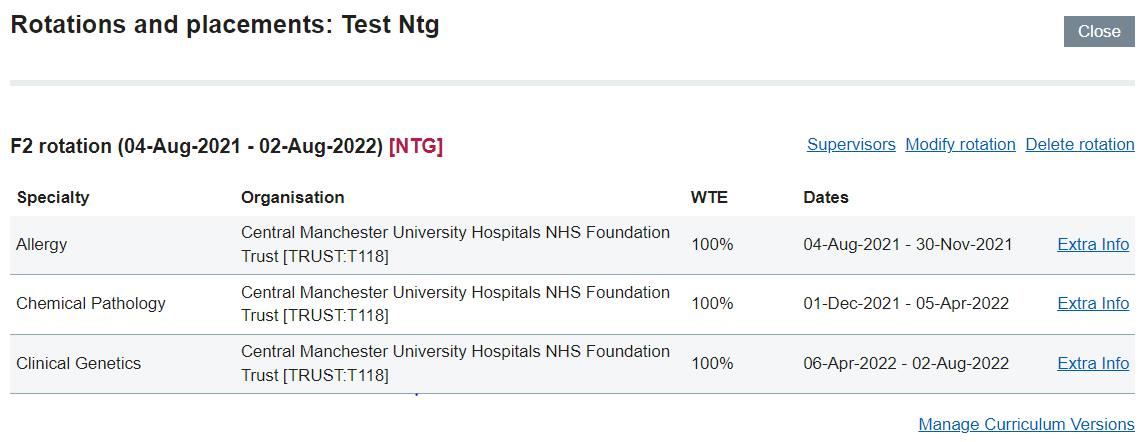
Any user with a portfolio without this label is a foundation doctor (FD).
Learn more about how to
My rotation on Horus ePortfolio shows as F2 NTG but it should be higher than this. Can it be updated to reflect my actual grade?
Horus ePortfolio is primarily a foundation e-portfolio and therefore can only display rotations at this level (F1 and F2). Any users working at a higher grade than F2 and still wants to use Horus ePortfolio as an NTG will have their rotation listed as F2 NTG.