Usernames and passwords
Username and password basics
What is my username?
Your username is the email address with which you are registered on Horus.
Learn more about retrieving your registered email address.
Learn more about changing your username.
What is my password?
When your account is created, you will receive an automatic activation email. When you select the link in this email, you will be asked to set up a password - this will be your password for Horus until you change it.
Learn more about resetting your password.
Username
I have forgotten the email address with which I am registered on Horus
If you don't know with which email address you are registered on Horus, contact your local Horus ePortfolio administrator (this will usually be your local postgraduate centre administrator or foundation school administrator). They can remind you of the email address held for you on Horus once they have confirmed your identity.
If you can't access the email address with which you are registered on Horus or it is incorrect, learn more about what to do next.
I can't access the email address with which I'm registered on Horus
If you can't access the email address with which you are registered on Horus, contact your local Horus ePortfolio administrator (this will usually be your local postgraduate centre team). They will be able to change your email address for you.
If you are an administrator, learn more about how to change another user's email address.
How do I change my username?
Horus does not use usernames. You sign in to Horus with your email address.
Learn how to change your email address.
How do I change my email address on Horus?
If you know your Horus login details, you can change your email address when you are logged in to Horus.
- Sign in to Horus ePortfolio
- Select your name in the top right hand corner (next to 'Sign out')
- Select the 'Edit account information' link
- In the 'Email' field, delete the email address and type your new email address
- Enter your current password (for security)
- Select 'Save Changes'.
If you don't know the email address with which you are registered on Horus, learn more about retrieving your registered email address.
As an administrator, how do I change another user's email address?
- In the 'Admin menu', select either 'Foundation Doctors/NTGs' or 'Users', depending on which user you need to change an email address for
- Search for the relevant user using the available filters
- Select 'Account' next to the relevant user
- In the "Email" field, delete the email address and type or paste in the new email address
- Select "Save Changes"
If the user has not logged in to Horus before, they will need to use this new email address to set their password.
Password
How do I reset my password for Horus
- Go to the Horus sign in page
- Select the 'Unable to sign in?' link
- Enter your email address in the box
- Select the 'Recover password' button
- Wait for an automatic email to arrive in your mailbox from noreply2.horus@nhs.net (remember to check your junk mail)
- Select the link in the email (the link will only be active for 24 hours)
- Enter your new password in the two boxes
- Select the 'Save' button.
Learn more about what your password reset email will look like.
Learn more about what to do if you do not receive your password reset email.
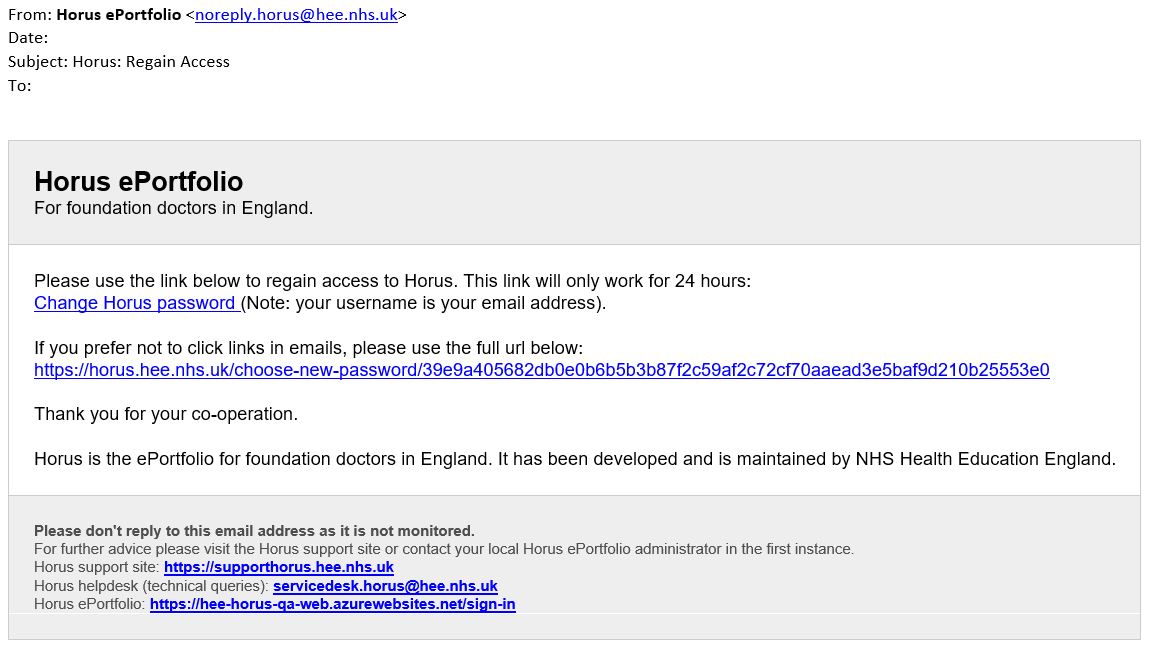
What will my password reset email look like?
Your Horus ePortfolio password reset email will look like this:
Learn more about how to reset your password.
I have forgotten my password
Use the reset password facility to reset it.
How do I change my password?
If you know your password and would like to change it, you can do this when you are logged in to Horus.
- Sign in to Horus
- Select your name in the top right hand corner (next to 'Sign out')
- Select 'Change password'
- Enter your current password and then your new password in the next two boxes
- Select 'Change password'.
If you don't know your password, you should use the reset password process.
What are the password rules for Horus?
Passwords must be at least 8 characters, the most commonly used passwords will also be blocked.
For further advice on password management please see the National Cyber Security Centre website.